Link Mapping
Mapping EA Connectors to Work Item Link Roles
To map EA connectors to Polarion Work Item Link Roles, the matching rule is also used:
<linkRule>
    <matchingRule>
        <externalProperty name='_linkField' value='implements' />
        <myumlProperty name='_objectType' value='Realization' />
    </matchingRule>
</linkRule>
In this example the link role “implements” from Polarion (externalProperty) is mapped to the EA connector type “Realization” (myumlProperty). In order to use Polaron Link Roles, you have to use the ID of the defined link role in the mapping file.
Supported link types
| Link Type | XML Type | XML Stereotype |
|---|---|---|
| Abstraction | Abstraction | |
| Aggregation | #Aggregation | |
| Association | Association | |
| CommunicationPath | CommunicationPath | |
| Composition | #Composition | |
| Connector | Connector | |
| ControlFlow | ControlFlow | |
| Dependency | Dependency | |
| Deployment | Deployment | |
| EA Trace (Abstraction) | Abstraction | EAUML::trace |
| EA Trace (Dependency) | Dependency | EAUML::trace |
| Extend | Extend | |
| Extension | Extension | |
| Generalization | Generalization | |
| Include | Include | |
| InformationFlow | InformationFlow | |
| Instantiation | Usage | StandardProfileL2::Instantiate |
| Manifest | Manifestation | |
| Nesting | Dependency | EA Specifics 1.0::nesting |
| ObjectFlow | ObjectFlow | |
| PackageImport | PackageImport | |
| Realization | Realization | |
| Substitution | Substitution | |
| SysML Allocate | Abstraction | SysML1.4::allocate |
| SysML Copy | Dependency | SysML1.4::copy |
| SysML Derive | Dependency | SysML1.4::deriveReqt |
| SysML Refine | Dependency | SysML1.4::refine |
| SysML Satisfy | Dependency | SysML1.4::satisfy |
| SysML Trace | Dependency | SysML1.4::trace |
| SysML Verify | Dependency | SysML1.4::verify |
| Template Binding | TemplateBinding | |
| Transition | Transition | |
| Usage | Usage |
Extended Link Types
To use a stereotype properly, find the full qualified name of the stereotype in EA properties of that link.
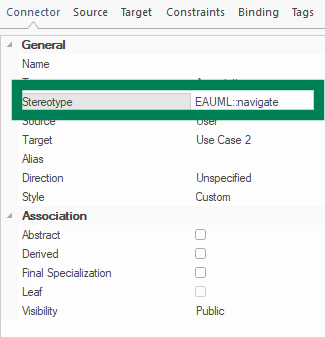
If you want to use extended connectors you have to use stereotypes. For example, a trace connector in EA is a dependency with the stereotype EAUML::trace. For a trace connector, the matching rule would look like this:
<linkRule>
    <matchingRule>
        <externalProperty name='_linkField' value='implements' />
        <myumlProperty name='_objectType' value='Dependency' />
        <myumlProperty name='_stereotype' value='EAUML::trace' />
    </matchingRule>
</linkRule>
Another example for a extended connector type is a satisfy connector from SysML:
<matchingRule>
    <externalProperty name='_linkField' value='implements' />
    <myumlProperty name='_objectType' value='Dependency' />
    <myumlProperty name='_stereotype' value='SysML1.4::satisfy' />
</matchingRule>
Usage of Aggregation and Composition as virtual connector types
To use Aggregation or Composition connector types, objectType has to be set to #Aggregation or #Composition.
<linkRule>
        <matchingRule>
            <externalProperty name='_linkField' value='implements'/>
            <myumlProperty name='_objectType' value='#Aggregation'/>
        </matchingRule>
</linkRule>
<linkRule>
        <matchingRule>
            <externalProperty name='_linkField' value='depends_on'/>
            <myumlProperty name='_objectType' value='#Composition'/>
        </matchingRule>
</linkRule>
Note
Associations with "shared or composite" Target Aggregation Property now also need the virtual Type mapped. Aggregations with "shared or composite" Source Aggregation Property still need Association Type mapped.
Example Link Mapping
Optionally one or many stereotypes can be applied to your matching rules. If you want to export only SysML traces that include your custom stereotype you would create a rule as follows:
<linkRule>
    <matchingRule>
        <externalProperty name="_linkField" value="depends_on" />
        <myumlProperty name="_objectType" value="Dependency" />
        <myumlProperty name="_stereotype" value="SysML1.4::trace" />
        <myumlProperty name="_stereotype" value="MyProfile::MyStereotype" />
    </matchingRule>
    <properties />
</linkRule>