Textual Notation
Warning
Please note that version is a preview version. Do not use this version in a productive environment. Your feedback is highly appreciated.
How to use
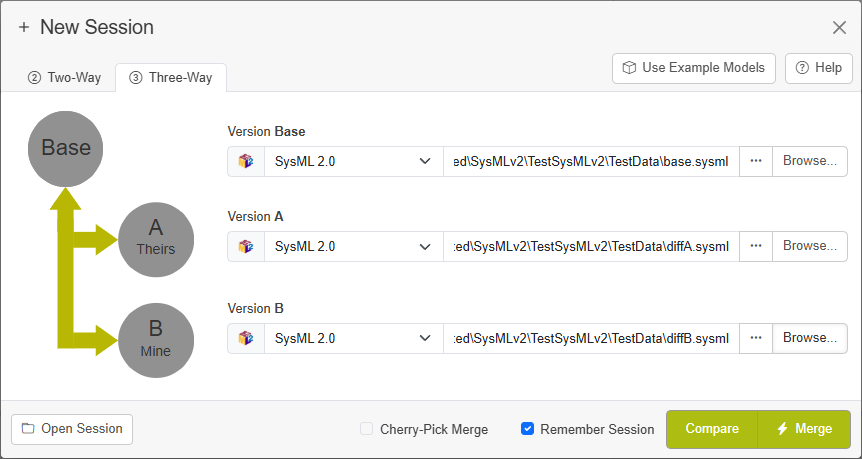
To use LemonTree for SysMLv2 textual notation, select SysML 2.0 textual notation as file type and select a .sysml file from the file dialog:
Note
Please keep in mind that no diagram view is available using textual notation. Instead, the textual notation will be rendered with the possibility to jump to the corresponding elements in the model tree.
Base for Comparison - Limitation for Name Changes
LemonTree usually relies on identifiers to compare elements, detect changes and identify conflicts. Since the textual notation does not provide unique IDs, LemonTree matches elements on the full qualified name (namespace + name). Therefore in the current version, a change to the name of an element will result in having this element as removed on one side and added on the other side. This will be improved in future version of both the SysMLv2 standard as well as in the LemonTree implementation.
Conflict Detection
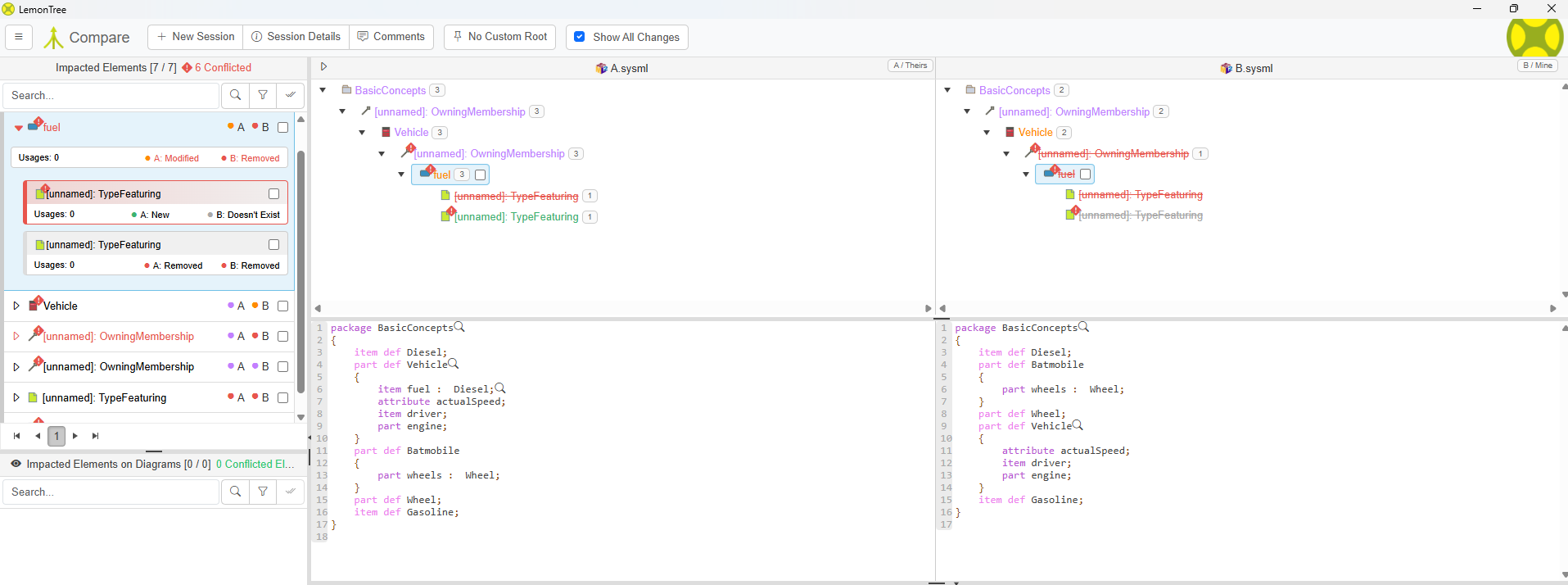
In order to have LemonTree detect conflicts of element changes, you have to use a three-way diff / merge. Only if you provide a common base model, LemonTree will be able to identify conflicts:
Supported SysMLv2 types
LemonTree is supporting following types from SysML v2 textual notation:
Package
package Package1;
Package with Body
package Package1
{
    part def Part1;
}
Alias
part def PartDef1;
alias PartAlias for PartDef1;
Import
public import Package1::*;
Recursive Import
private import Package1::**;
Part Definition
part def Vehicle;
Abstract Part Definition
abstract part def Vehicle;
Variation Part Definition
variation part def Engine;
Part Usage
part def Vehicle;
part vehicle1 : Vehicle;
Item Definition
item def Fuel;
Item Usage
item def Fuel;
item fuel : Fuel;
Port Definition
port def PowerPort;
Port Usage
port def PowerPort;
port power : PowerPort;
Attribute Usage
attribute def MassValue;
attribute mass : MassValue;
Interface Definition
interface def ElectricalInterface;
Interface Usage
interface def ElectricalInterface;
interface powerIf : ElectricalInterface;
Action Definition
action def StartEngine;
Action Usage
action def StartEngine;
action start : StartEngine;
Constraint Definition
constraint def MassConstraint;
Constraint Usage
> Ignore
assert constraint massLimit
{
    mass < 1000
}
Requirement Definition
requirement def SafetyRequirement;
Requirement Usage
requirement def SafetyRequirement;
requirement safetyReq : SafetyRequirement;
Analysis Definition
analysis def ThermalAnalysis;
Verification Definition
verification def VerifyMass;
State Definition
state def EngineState;
State Usage
state def EngineState;
state running : EngineState;
View Definition
view def VehicleView;
View Usage
view def VehicleView;
view vehicleView : VehicleView;
Viewpoint Definition
viewpoint def StakeholderViewpoint;
Metadata Definition
metadata def ToolMetadata
{
    attribute toolName : String;
}
Dependency
part def Vehicle;
part def Engine;
dependency Vehicle to Engine;
Comment
comment /* Vehicle subsystem */
Documentation
doc /* System documentation */
Textual Representation
rep language "sysml" /* part def Vehicle; */
Enumeration Definition
enum def Color
{
    red;
    green;
    blue;
}
Exhibit State
part controller
{
    exhibit state operational;
}
UseCase
use case def usecase1;
use case uc2 : usecase1;
SysMLv2 Types not yet supported
The following types from SysML v2 textual notation are not yet supported by LemonTree. Future versions of LemonTree will support those types.
Attribute Definition
attribute def MassValue :> Real;
Connection Definition
part def Tank;
part def Engine;
connection def FuelLine
{
    end source : Tank;
    end target : Engine;
}
Connection Usage
connection fuelLine : FuelLine
connect tank to engine;
Binding Connection
bind controller.signal = actuator.signal;
Calculation Definition
calc def ComputeMass
{
    return : Real;
}
Transition
transition
first idle
accept startSignal
then running;
Metadata Usage
@ToolMetadata
{
    toolName = "ToolX";
}
Send Action
send signal1 to controller;
Accept Action
accept trigger1;
Decision Action
if condition1 then action1 else action2;
Flow Connection
flow connection powerFlow
from source to target;